To create a video montage, I first wanted to understand both pre and post-production to the best of my ability before starting the project. While my previous blog post covered all kinds of information regarding pre-production, this post will cover post-production: my challenges, the editing process, and my overall thoughts on creating this project.
The Bare Bones Camera Course for Film and Video
Chapter 10: After the Shoot – Editing
In this chapter, Tom Schroeppel discusses how editing should feel: fun! Besides giving readers advice such as pacing the video shots without distractions or making sure every shot is different, Schroeppel makes sure to let his audience know that this is their project. While it is important to keep track of the pacing, matching the music, checking the sounds, etc., it all really depends on how you want to relay your message to your audience. I took this point away from the chapter because of how different it can make a shot. There can be the same exact event in front of you, but no shot will ever be the same! Same with directing, every director can have a different vision for the same exact shot. It all depends on who is shooting it!
I wanted to show some examples of various editing styles:
Euphoria S2E1 – New Year’s Party
Euphoria S2E1 – New Year’s Party (2022)
Of course, when mentioning editing Euphoria should always come up. Sam Levinson, the director of the show, knew exactly how to capture emotion through both camera movements and editing. The slow motion zoom to the main characters with such a busy background show the intensity of their situation, with a fade to black when transitioning to each character. The music matching the transitions perfectly also ties into the intensity of the scene, and the slower pacing shows the characters’ thoughts vividly on their faces. All in all, Euphoria is one of my favorite shows to talk about when mentioning editing, because of how vivid and real the scene becomes with the right scenes, music, etc.
Attack on Titan S3E2 – Levi vs. Kenny Squad
This scene, known to be on of the most iconic scenes in Attack on Titan and is admired for its animation, shows a more personal attack on Levi, the Survey Corps’ Special Operations Squad captain. His childhood mentor, Kenny, was hired to take out the team, including Levi. This betrayal and anger was shown perfectly throughout this scene, through super fast pacing as they swing around and faster transitions when a gun or ODM grappling hook fires. The SFX mixed with the fast-paced animation added to the intensity of the scene, and was able to show Levi’s nerves, something he usually doesn’t show. The added-in flashback of Levi (01:39 second mark) shows the audiences Levi’s thoughts, and adds in even more context to the intense scene. This scene, besides it’s insane animation, gives the audience a new perspective of the captain through the intense editing of this moment.
Tangled (2010) – “I See The Light”
Now for a calmer scene, this scene captures a beautiful moment for Rapunzel as she finally sees the lanterns for the first time after such a long journey. There is medium pacing in this scene, around 3-5 seconds per shot, some even slower for emotional beats. The super smooth pacing and transitions heighten the romance between the couple, and the glow of the lanterns and their reflections in the water matches the scene perfectly. There are even dissolves and crossfades to move between Rapunzel and Flynn’s perspectives, then zooms back out to emphasize shared moments between the two. One of my favorite Disney movies, this scene shows a new perspective of both the characters, as they finally realize their feelings.
Editing My Own Montage
Now it’s my turn! In creating a montage, I wanted to capture a moment in my everyday life. With the falling leaves and autumn weather, this is the perfect time to capture my morning walk around my neighborhood. Already finished with my pre-production planning from my previous blog, I had everything I needed to begin production.
Now, it was time for me to get comfortable bringing a tripod around my neighborhood. On a mission to not get any houses or people in my video, I did my best with what I could capture. In the end, to avoid any misunderstandings, I created a montage of my backyard, a place that has captured many of my favorite childhood memories. Using various composition techniques and angles, I tried my best to capture the relaxing feeling of my backyard. With slower pacing and relaxing music, the montage gives a small glimpse into my backyard. Enjoy!
Brands today have unlocked new ways of engaging newer audiences and luring them into buying products that they’ve never seen before. How do they do it? Well, besides the power of social media, the power of behavioral economics has constantly been proven to persuade customers into buying newer products!
Behavioral economics studies how people actually behave — which is often messy, biased, and satisficing — rather than how they’d behave if perfectly rational. Designers translate those predictable biases into tools: defaults, framing, anchors, scarcity cues, and social proof are all ways to shape choice architecture so users make better (or at least more desirable) choices. In an article, Bridgeable collects practical BE “principles” for designers and show how anchoring, default settings, and loss aversion can be applied in real product flows and capturing newer consumers.
Gestalt Principles
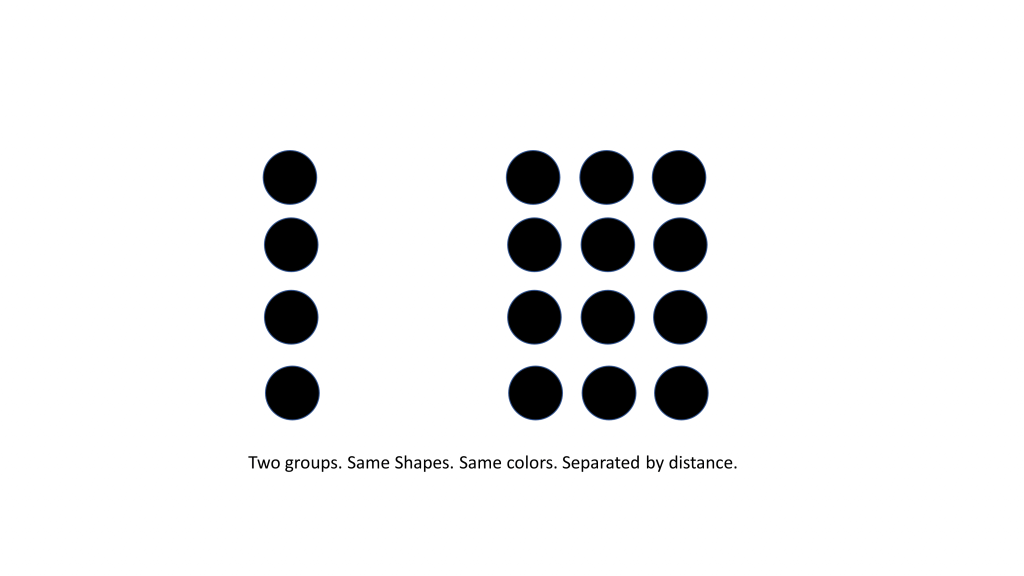
Two psychological toolkits designers rely on heavily are Gestalt principles and affordances. Gestalt gives us laws of perceptual organization — proximity, similarity, figure–ground, etc. — that help users analyze visual information immediately. Let’s name a few!
Similarity: Do the elements look alike?! Same colors, font, size, texture?!!
Simplicity: Our minds perceive everything in it’s simplest form.
An example I’ve used before of simplicity: making everything easy-to-use and accessible for users! All elements are simple in design.
Proximity: We perceive elements as belonging to the same group if they are closer together.
The good use of Gestalt’s principles reduces cognitive load on consumers: group related controls, make the primary action pop, let the eye follow natural continuity. Canva’s summary on Gestalt offers great visual entry point for these ideas.
Affordances are the cues that tell a user how to interact with an object (a button that looks pressable, a slider that looks draggable). When affordances align with user expectations, decisions are frictionless; when they don’t align, users hesitate, make errors, or abandon tasks. The Interaction Design Foundation’s article explains why designing obvious affordances is crucial when designing.
Creating Emotional and Sensory Decisions
Behavioral economics also reminds designers that decisions are emotional and sensory, not just rational. Multi-sensory design (sound, motion, haptics, even smell in physical environments) creates stronger memories and shapes preferences. Digital designers are now bringing subtle sound cues, motion, and tactile feedback into interfaces to make experiences stickier — not as tricks, but as an extension of the brand’s personality and affordances.
“Every experience in design is multi-sensory, whether we want it or not.”
Behavioral economics gives designers the power to shape decisions, but the best designs aren’t about forcing behavior—they’re about guiding it. Thoughtful nudges, clear affordances, and perceptually intuitive layouts help users move through an experience effortlessly, leaving them feeling confident, informed, and in control.
Every click, scroll, or swipe is a tiny moment where design meets human psychology. By understanding how perception, emotion, and bias influence decisions, designers can craft experiences that feel natural and satisfying. The subtle science behind our choices isn’t just a tool, it’s a bridge between human behavior and genuine, meaningful design.
The Bare Bones Camera Course for Film and Video, Tom Schroeppel
Chapter One: Basics
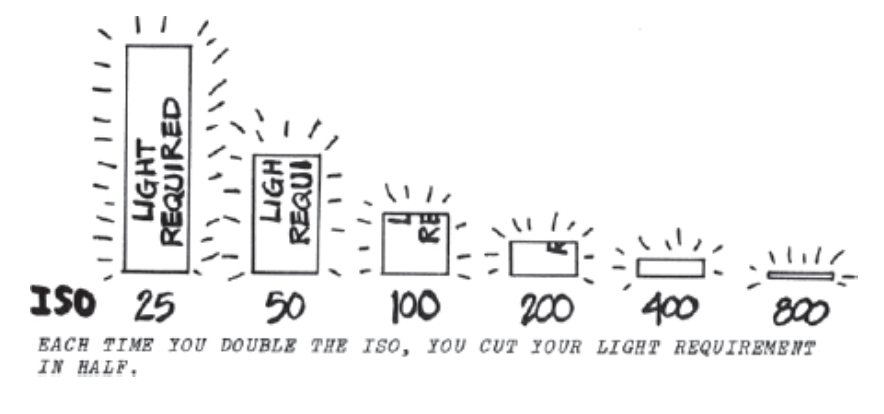
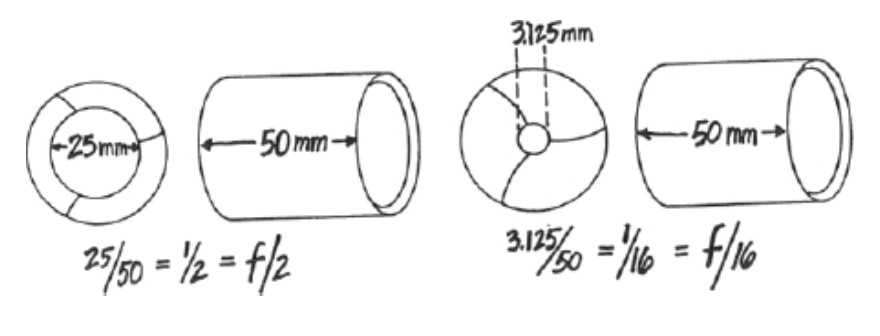
In the opening chapter, Schroeppel lays out the essential building blocks of filmmaking—exposure, lenses, and depth of field. He compares the camera to the human eye, showing how it can move beyond simple observation to become a tool for storytelling. I gained a clearer understanding through images and demonstrations of how aperture, shutter speed, and ISO work together to shape an image’s brightness, sharpness, and overall mood, while depth of field controls what draws the viewer’s attention within the frame.
Images from Tom Schroeppel’s “The Bare Bones Camera Course for Film and Video” Chapter 1; left image explaining ISO and right image explaining aperture.
Chapter Two: Composition
This chapter shifts from the more technical aspects of filming to the artistic decisions that define visual storytelling. Schroeppel explores the importance of composition—using the rule of thirds, balance, and leading lines to guide the viewer’s eye and convey meaning. I learned how choices in framing and camera angles can shape the audience’s perception and emotional response. Every shot becomes a conscious decision, whether in journalism or film, to express a narrative, create a metaphor, or evoke a specific mood—all without relying on dialogue or sound. I wanted to point out Schroeppel’s point of a shaky camera ruining the viewer’s ‘illusion’ of what should be a steady shot using a tripod. It is just so interesting how a camera can give almost any illusion; a shaky camera can give a sense of urgency, while a steady shot can be more calm. An unusual angle can highlight an unusual situation, while a regular angle shows the viewers exactly what is going on.
Chapter Five: Camera Movements
In this chapter, Schroeppel explains that camera movement builds on composition by adding rhythm and energy to the visual story, which I feel is similar to composition. Schroeppel explains that movements such as zooms, pans, tilts, and tracking shots aren’t just stylistic choices; they serve clear narrative purposes for a story. A simple MOTION can reveal important key details. I found it interesting, similarly to composition, how even subtle camera shifts can dramatically influence a scene—whether in a film, documentary, or any other production project. The way the camera moves ultimately determines how the viewer experiences the story.
Chapter Six: Montages
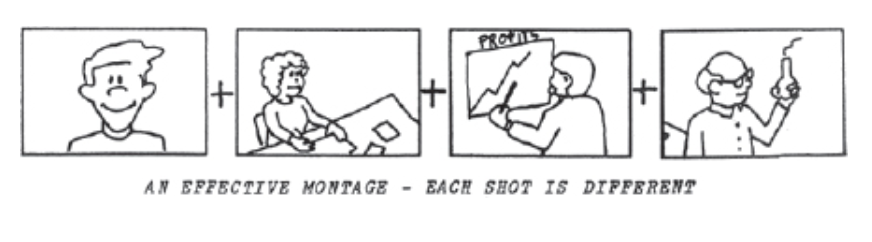
Montages, usually used in TV commercials or documentaries, condense time and distance for viewers. A series of shots, depending on the content, can set a mood or summarize information, making montages an easier way to relay a message. Schroeppel made sure to note, however, that it is crucial to make each shot of a montage different. If not, it can look like a “bad cut between two similar shots of the same thing”. Schroeppel. recommends shooting a variety of different angles and image sizes to create a successful montage, and switch things up.
Image from Tom Schroeppel’s “The Bare Bones Camera Course for Film and Video” Chapter 6, Montages.
In this article by Jacob Trussel, we are given 15 things to do during video production. Different tasks include defining your goals, writing your script, creating storyboards, and much more. We are given step-by-step instructions in video production, and this checklist doesn’t miss a step. Things like selecting the type of video or creating a schedule aren’t things I would’ve thought of before, but now will as I get into production.
This article, written by Amanda Athuraliya, explains the concept of storyboards, and how beneficial they are to successful projects. Storyboards involve sketching out the scenes you plan on creating, kind of like a comic strip. This idea can help list out any ‘inconsistencies’ in your idea, and can help in avoiding shooting any unnecessary scenes. The four steps to creating a storyboard include planning your video, visualizing your script, adding a script and additional notes, and collaborating or revising with others. These steps help greatly in finalizing a story before actually shooting, and can help so much in production.
Miles Morales Jumps / A leap of Faith – 4K HDR – Spider-Man (2018), starts at 0:36
To show some examples of successful uses of visual composition techniques, I felt that this movie was a perfect example. Known as a movie that breaks the rules of animation, Spider-Man: Into the Spider-Verse also uses many unique techniques that make the movie special. In this scene, Miles is swinging around New York after taking a leap of faith. The camera leaves open space ahead of where Miles is swinging, giving him “lead room.” This creates a sense of motion and anticipation for viewers, and gives the illusion that the city is endless. Leading lines and rule of thirds are also used, as the city’s lines and angles draw the eye toward Miles while he is swinging and some angles show Miles on the third lines. All in all, this movie, one of my favorites, provides many different techniques to give viewers a unique look into Miles’ thoughts and show different perspectives throughout both movies.
Of course I had to use my favorite movie 🙂 This scene alone, from the beginning gives viewers context of the character’s location using rule of thirds. The scene starts with the peach tree and Oogway on the right third line, and uses the rule of thirds to help viewers see both characters in the frame. As for the location, the rule of thirds allows viewers to see how isolated and high this peach tree is, with the stars behind them. All in all, this rule, widely used by directors, can give viewers much more to look at than the center of the screen, and give newer perspectives on scenes depending on what you’re shooting.
Dune: Part Two – Riding the Sandworm- (HDR – 4K – 5.1), starts at 0:20
Both Dune and Dune: Part Two provide unique camera techniques for such a unique concept. This scene in particular from Dune: Part Two gives viewers a great perspective on depth. We are shown just how big the desert around them is, and also a perspective on the sandworm’s size. In such a big desert and a pretty far away angle, the sandworm is still pretty large on the screen, which is bigger than they expected. This also shows viewers how Paul overcame such a big obstacle, riding a sandworm and fulfilling his prophecy. Viewers in the comments of this video also talk about the intensity of this scene, feeling like they were riding the sandworm with him. This shows how depth gave viewers perspective on such an intense obstacle, and pulled them in even more.
To get used to the camera and some newly-learned techniques, I will be creating a project of my own. I will be creating a montage, with many clips of one location compiled into a one-minute video. For this project I wanted to create a montage of my morning neighborhood walk, as my neighborhood can be quite beautiful around this time of year. With the leaves falling, birds chirping, and decorated houses, I’m sure I can make a cozy autumn video. I personally love content like this, so I decided to make one of my own. Using my iPhone and tripod, I will film my next morning walk and compile the videos into one montage. Using new angles and composition rules can make the video much more engaging and give viewers new perspectives.
In an economy where consumers increasingly pay for experiences rather than just goods or services, design has quietly become one of the most powerful value creators. Designers, now, can be seen as architects of value, not just aesthetics.
Design creates value through emotional connection. Don Norman’s ideas of emotional design helps explain why: great experiences operate at three levels — visceral (instant sensory reaction), behavioral (usability and pleasure in use), and reflective (meaning and identity tied to the product). When a product scores on all three, it doesn’t just satisfy a need — it becomes memorable and preferred. This is why a designer item or a warm coffee shop visit can feel like an emotional purchase compared to a transactional one.
Design Tactics That Speak Emotion
Practical tactics designers use to evoke emotion include color, typography, and interaction choreography. Color is one of the fastest emotional shortcuts: marketers and designers use red for urgency or passion, blue for trust and calm, and green for growth and health. Thoughtful color systems can surely increase recognition and nudge choices at the point of sale or sign-up.
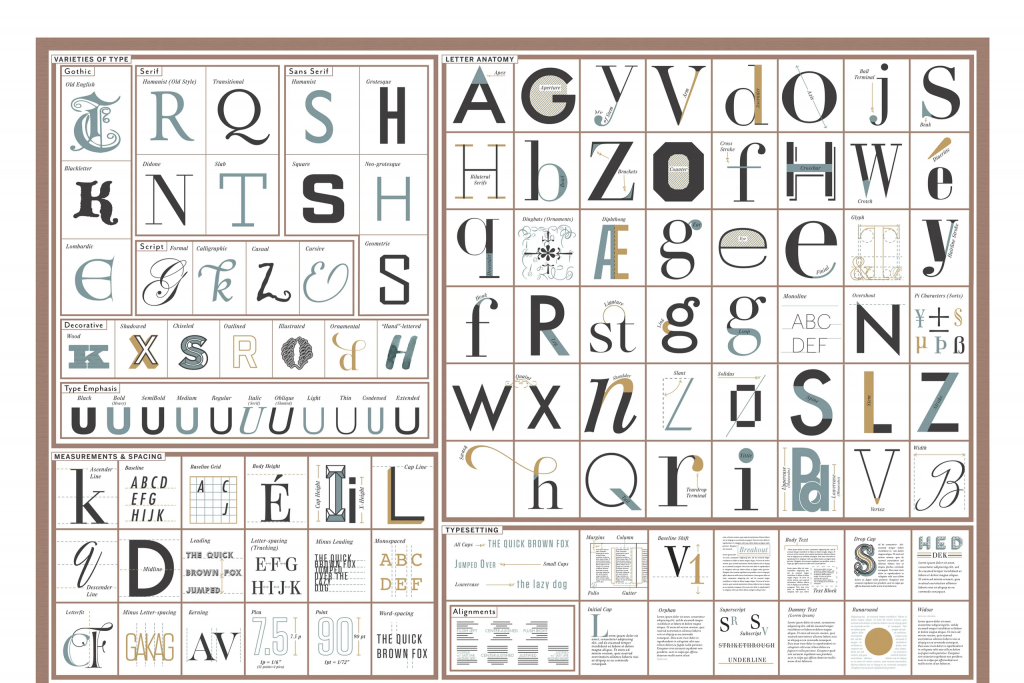
Typography matters too! Typeface choices carry personality: serifs can signal tradition and credibility, sans-serifs feel modern and clean, and script or display faces can feel playful or luxurious, or even romantic. Recent neuroscience and UX research shows that letter shapes and readability influence not only comprehension but also emotional response and trust — meaning typography can be a design tool for shaping how someone feels about a brand before they even read a word.
Some of the most successful brands use design to stage emotional experiences. Apple is a master of visceral delight — its minimal product design, clean typography, and gallery-like stores make every interaction feel intentional. The company also delivers behavioral satisfaction through intuitive interfaces and reflective value through brand identity; owning Apple products can signal creativity and design awareness for consumers.
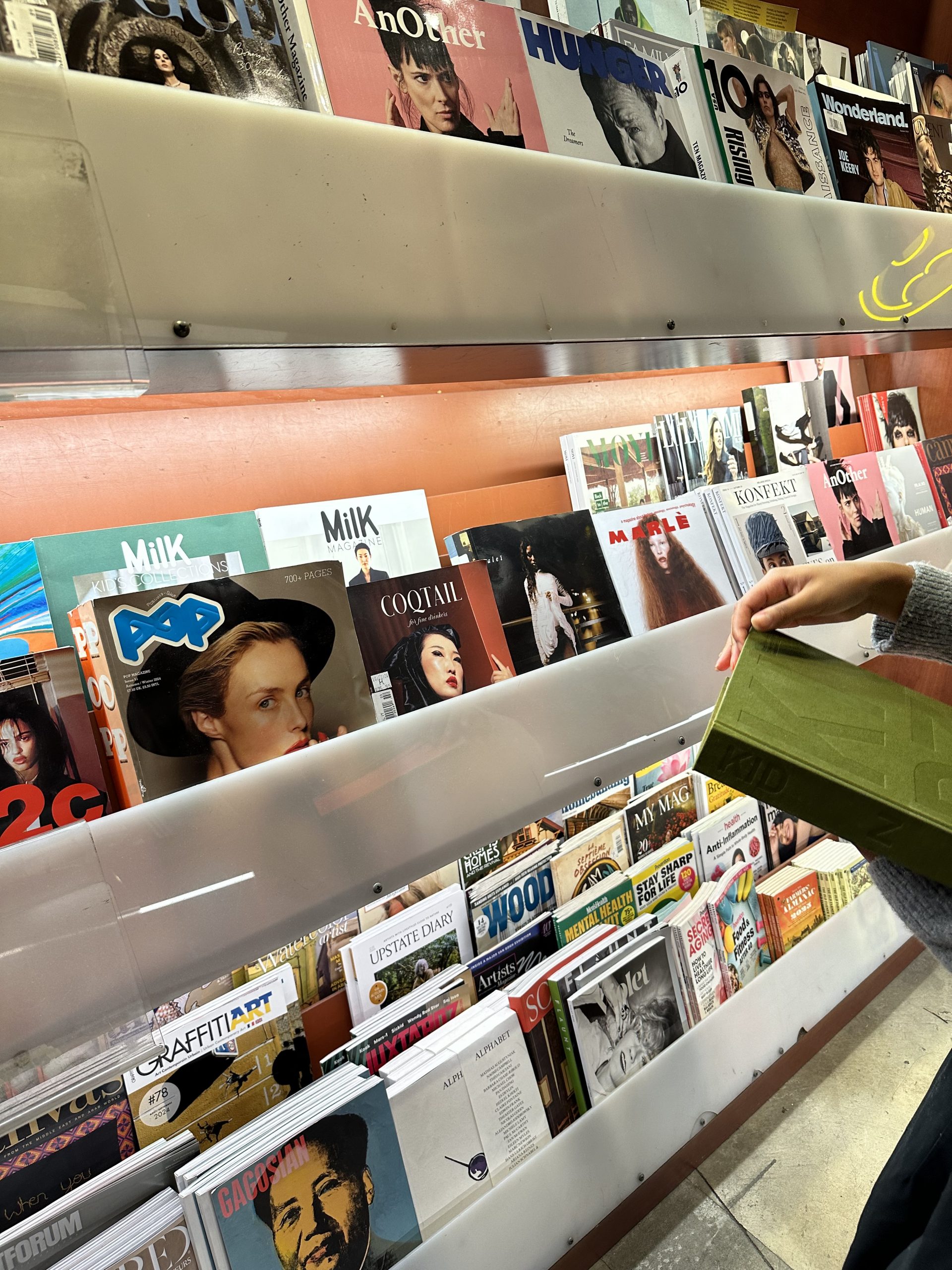
Barnes & Noble takes a similar approach through sensory design with their cafes. The cafe’s lighting, music, and books all around work together to create comfort and familiarity, turning an ordinary coffee run into a ritualized experience for readers. Both brands demonstrate that emotion, not just function, can drive loyalty and premium pricing.
Using Design Tools to Map Emotion
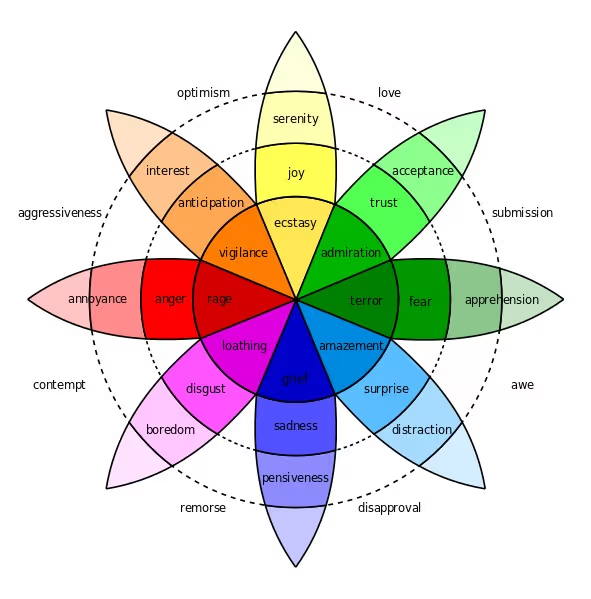
Designers also use emotional models to be intentional. Tools like Plutchik’s Wheel of Emotions help teams map which emotions (joy, trust, surprise, anticipation) they want to trigger and then choose design elements accordingly — for example, using warm tones and rounded shapes to evoke comfort and trust, or contrast, motion, and surprise to evoke excitement. This moves design from “making things pretty” to a strategic role in experience engineering.
Plutchik’s Wheel of Emotions helps match primary emotions to corresponding colors. His theory has helped all kinds of designers when creating projects.
Finally, measurable ROI (return-on-investment) follows emotional connection. Experiences that evoke positive emotions drive retention, word-of-mouth, and willingness to pay. The practical takeaway for visual storytellers and product teams is simple: design every touchpoint (visuals, words, interactions, environment) with the emotional arc in mind — stage the visceral, deliver useful behavioral outcomes, and create reflective meaning that customers may want to bring into their identity.
Design in the experience economy should not be skipped — it is crucial! When designers combine evidence (color & type research), models (Norman’s three levels; Plutchik’s wheel), and brand staging (Apple, Starbucks), they do more than shape appearances: they create value that customers emotionally invest in — and gladly pay for.
In so many ways, designers can make any experience memorable through design. Such emotional responses by consumers will encourage them to come back, buy again, and refer the product to others. In my opinion, design can probably attract more consumers than the product itself. It is up to the designer to make the product stand out.
Every time I get into a new project, there is always something new to learn about the production process. Not every project is the same, and some may have to be done differently than others – which is okay!! I’ve done some research on recording and editing audio for my upcoming podcast, Let’s Have a Sleepover!
This blog post focused on how to get the right sound on a tighter budget. One of his tips that resonated with me was being careful when vocal editing. While this may apply more towards music, I think it is also important to remember for podcast editing as well. During post-production, to keep things more natural-sounding for the audience, it is important to keep editing to almost a minimum, besides the added music or sound effects. Depending on different tools to alter or change your voice can easily ruin a podcast if overused.
Another point that I wanted to highlight was the importance of taking several takes to get the right sound. Again, while this mostly applies to music, this is just as valid for podcasting. To get the more natural sound of your voice, several takes must be made to get you more comfortable for the mic.
In this article, Videomaker stresses the importance of audio in video productions. They even encourage readers to think of editing audio first for their next project, as it can “transform” their sound and elevate their projects. From recording extra B-roll footage to post-processing your audio, Videomaker offers many tips to elevate your audio in post-production. I believe the author’s main point to readers is the importance of audio in any production, as it sets the bar for the project’s quality. Bad audio means bad quality, and good audio means… well you get it.
I have a couple of examples of projects that I’ve enjoyed recently with exceptional audio and sound effects:
Via Li, a YouTuber that I watch frequently, has a channel exclusively for journal entries – to share things she has learned, share advice, and update supporters on her life. I enjoy this channel because of how relaxed it is, and how personal the video feels. The audio quality, though she is holding the microphone in her hand (which I’ve heard is a big no-no in audio), is great, and the added in sound effects add a lot of mood to her video. Sound effects, to me, portray a new side of hosts that you may not see in the rough cut of the podcast, when they’re just sitting in front of the microphone. I definitely want to edit my podcast a bit similar to hers, as I like her editing style for both audio and video.
First off, apologies for such a sad scene 😭 Being such a quiet movie with almost no dialogue, this scene does a perfect job at keeping the audience on their toes. I also liked how the audio went super muffled when focusing on the girl, as it shows she is deaf. Hearing the quiet footsteps and then the sound of the toy rocket shows the audience how such a small noise can be much louder in their difficult situation, and keeps the audience engaged yet sympathetic for such a sad situation.
This scene involves the music syncing up perfectly to Baby’s life. Walking listening to Harlem Shuffle by Bob & Earl, the city’s noises sync with the song in his headphones. I love how playful this scene is, and how the music itself is pretty funky. Syncing them allows viewers to think they’re inside the character’s head, which is a pretty unique way to do so!
Through these examples and research of getting the perfect audio, I wanted to try creating a podcast episode for myself.
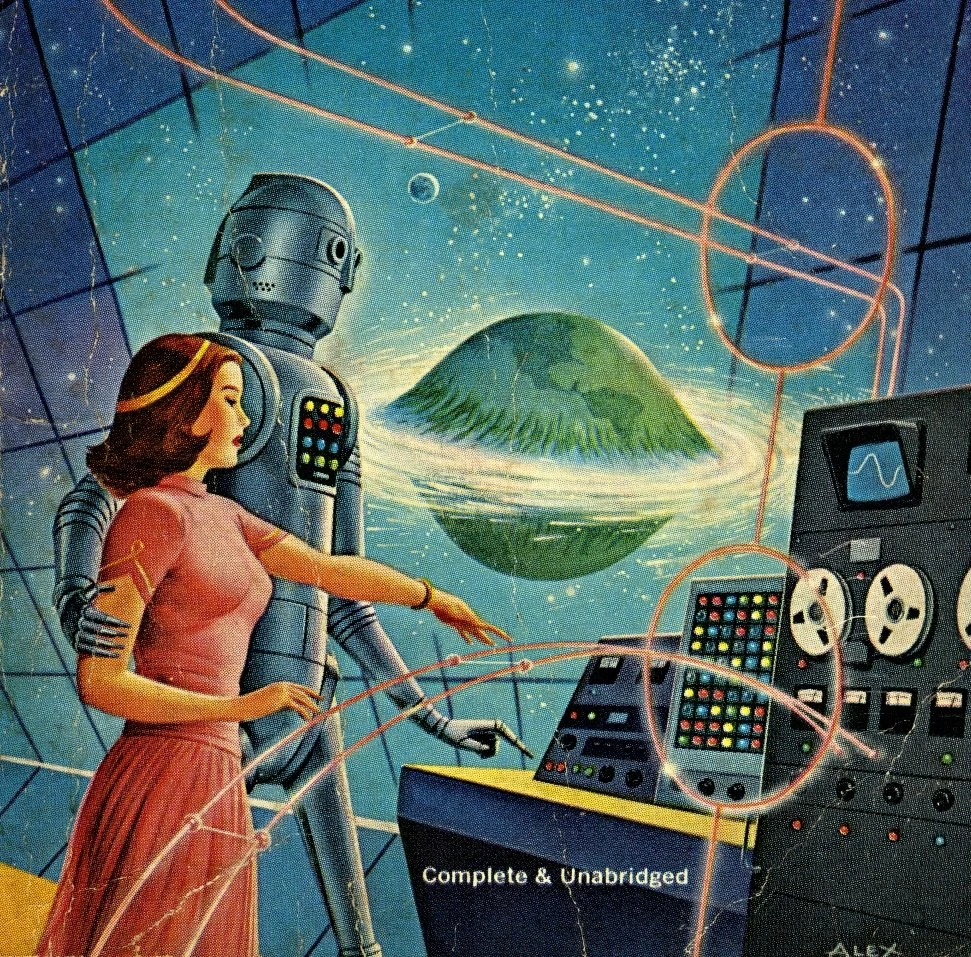
Designers are constantly asked to imagine the future — sleeker products, smarter systems, faster solutions. But imagination alone isn’t enough; it needs form, context, and meaning. That’s where design fiction comes in. Design fiction blends storytelling with design practice, using narrative and visual artifacts to make speculative futures feel real enough to explore. Instead of asking “What will the future look like?”, it asks, “What if this future existed — and how would it feel to live there?”
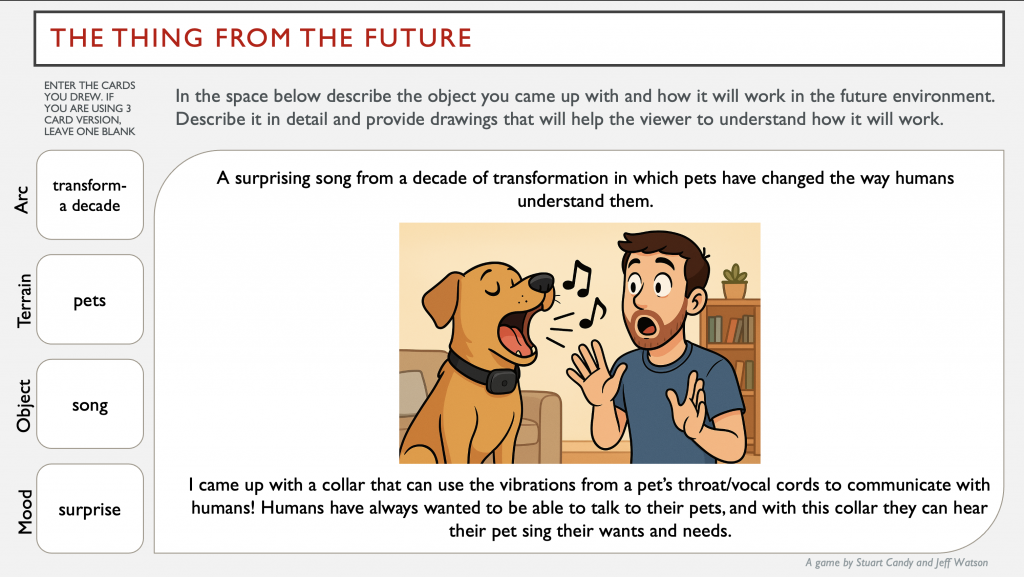
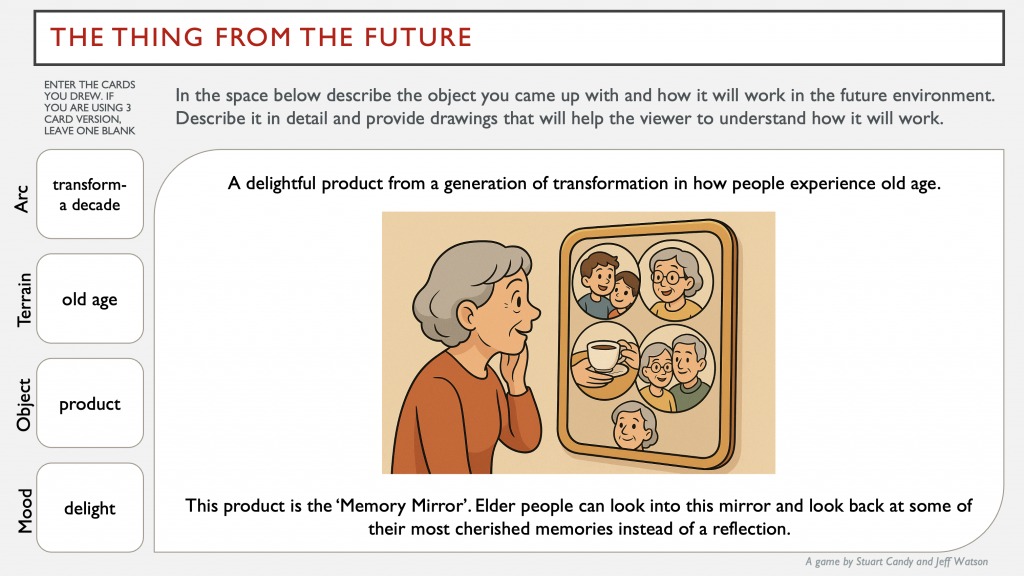
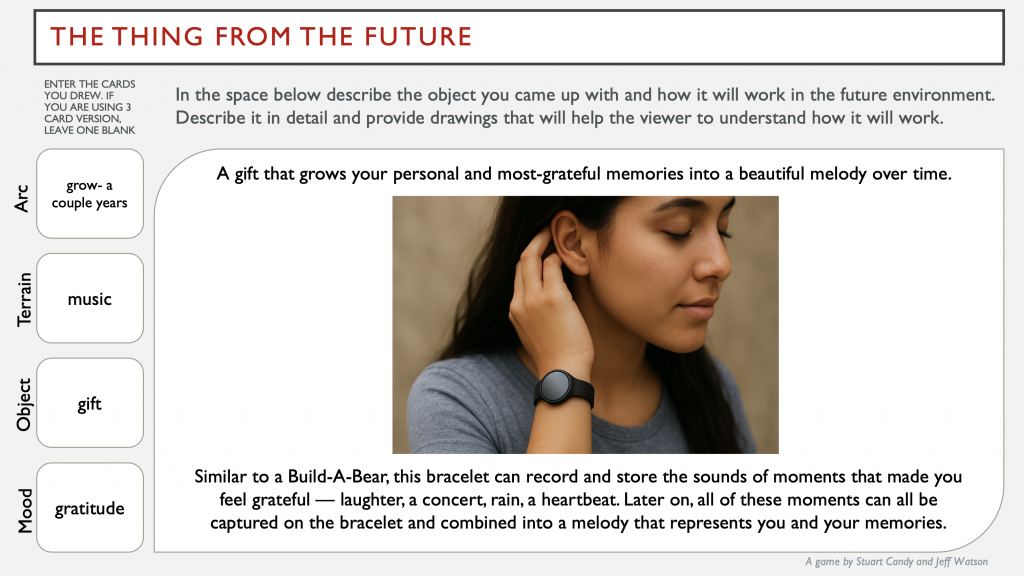
In an exercise I participated in called ‘The Thing From the Future‘, I was randomly given four words under the themes arc, terrain, object, and mood. With the four words generated, I was assigned to create a product or solution and describe it even further. When I first played the game, I thought it would just be a fun brainstorming activity — random prompts and creating odd gadgets from imaginary futures. But the moment I drew the most random card combinations, a new creative side of me unlocked. From the EchoBracelet, a wearable device that lets people replay sounds from their favorite memories, to the MemoryMirror, a mirror that allows elderly people to look into some of their most cherished memories, I created such random ideas from the most random words. After so much thinking, I began to realize that I wasn’t just designing an object — I was designing a story.
‘The Thing From the Future’ exercise, my results.
This was my starting point — my call to adventure when researching. The activity wasn’t only imagining technology; it was visualizing emotion. The EchoBracelet had to communicate intimacy, nostalgia, and connection through the design alone. That’s when I turned to the concept of design fiction, a method that uses storytelling and visual artifacts to explore possible futures. I enjoyed Richard Buday’s definition:
“Using fiction to test the use and acceptance of unusual designs”, Richard Buday 2020.
What Is Design Fiction and Where Does It Come From?!
To summarize, design fiction is a practice that creates story-worlds and populates them with diegetic prototypes — artifacts that exist inside these fictional worlds and make that world believable. Popular science fiction author Bruce Sterling introduced the term design fiction in the mid-2000s then expanded on it, calling it “the deliberate use of diegetic prototypes to suspend disbelief about change.”
How This Relates to Visual Design
Storytelling is at the core of effective design fiction, and it directly connects to how we approach visual design. The Medium article“How to Use the Hero’s Journey as a Design Thinking Tool” explains how narrative frameworks can guide design processes. The “Hero’s Journey” — where a protagonist leaves a familiar world, faces challenges, and returns transformed — mirrors how users experience a product. Good design visualizes this transformation, helping audiences see change, conflict, and resolution through composition, motion, and tone.
Conclusion
Ultimately, design fiction helps designers move from problem-solving to possibility-making. It uses narrative storytelling and visuals to ask deeper questions about responsibility, culture, and values. In a time when design often feels driven by algorithms or consumer trends, design fiction reminds us that the future is not something that happens to us — it’s something we can co-create, critique, and visualize together.
We all know the classic saying, “pictures are worth a thousand words”. But have you ever thought about how true the saying actually is?
Taking pictures on my digital camera has become one of my favorite hobbies recently. The pictures on my camera range from beautiful scenery to pictures of my friends and family. My digital camera contains basically my entire life’s memories so far.
I want to connect the concept of digital photos to visual storytelling. Defined by Andrew Losowsky, the “essence of visual storytelling is {the} combination of emotional reaction and narrative information,” by using the “colors, typography, style, balance, format of an image “{that} will generate that first instinctive smile or frown” (Losowsky, 4). In other words, various elements of an image including the colors or what is happening in it should tell the audience everything they need to know. There shouldn’t be any extra explanation needed, and these visual projects should be clear enough for anyone to appreciate and understand.
In an article by Mike Montalto from nonprofit Amplifi, he mentions that one of the best methods of visual storytelling is authenticity: keeping things real. If you ask me, digital pictures can be some of the most authentic since there aren’t any filters or fancy equipment enhancing the images, just the auto or manual mode and a flash.
To prove my point that digital camera pictures tell some of the best stories, I will show some of my favorite digital pictures from my three-month trip to Los Angeles!
This was the first picture I took on the trip! Excited to see just about everything, I took lots of pictures like any tourist would. Way in the back is the Hollywood sign, in the giant grassy mountains. Almost covered with billboards, you can see a busy street and a tall building, that one being the Hollywood United Methodist Church. While the picture is pretty grainy and doesn’t have the best quality, the Hollywood sign right in the center gives a glimpse of excitedness from an exploring tourist.
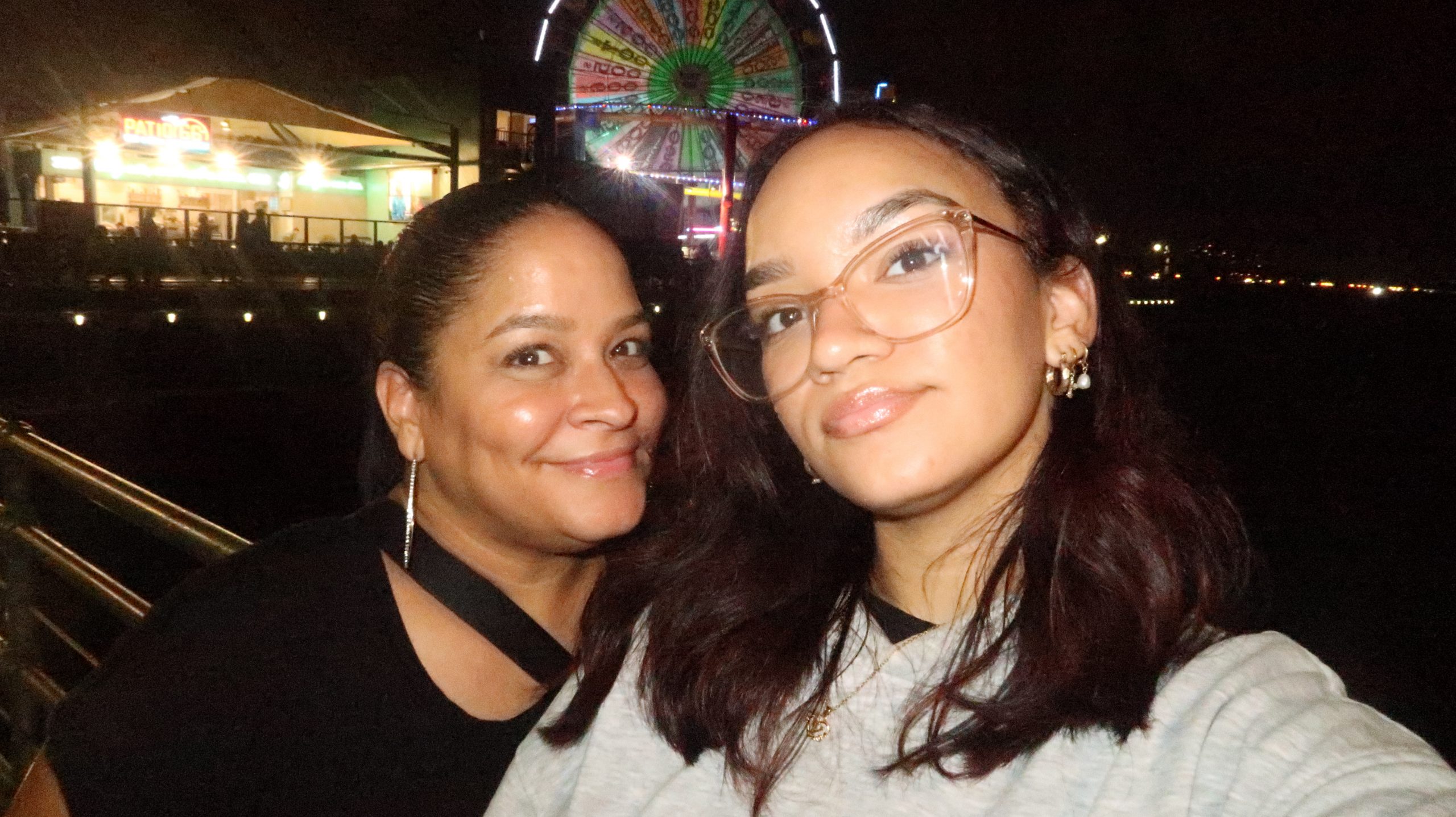
It’s been one week! Getting a bit more used to the busyness of Los Angeles, my mom visited for the weekend. With the lit-up ferris wheel and restaurant in the background, any California native would recognize the Santa Monica Pier. Almost pitch black in the sky, the dock was pretty windy and made things a lot colder, as you can tell from my hoodie.
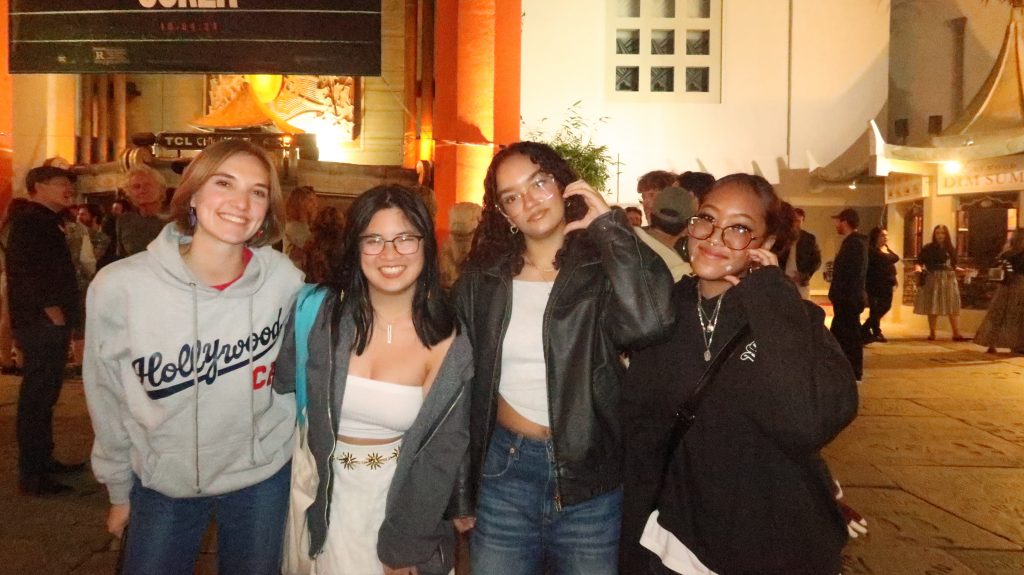
In this image, you see four friends, all smiling with one another, having a good time. The small sign in the back says TCL Chinese Theater, one of Hollywood’s most popular places. The hand and feet prints in the back mark some of Hollywood’s most significant figures, and you can see some intrigued people in the background of the image. As it was getting later, the friends are dressed pretty warm for a cold night ahead.
An article by Erica Santiago explains various elements of visual storytelling, with one of them being emotion, where “your visual story must make your audience feel something that generates an emotional connection”. I feel that this image may make an audience feel warm because of the lighting, and also how loud the picture comes across. With so many people in the background, you can tell that the environment is pretty loud and many tourists are around.
If you couldn’t tell from the face makeup, this was Halloween! We took this on the balcony of our hotel, right in the middle of downtown LA. My lazy attempt at recreating SAW and Dylan’s football costume take over the image, and our poses fill the image with silliness. The high buildings and busy street in the background also make the image a bit loud, as there’s a lot going on around us.
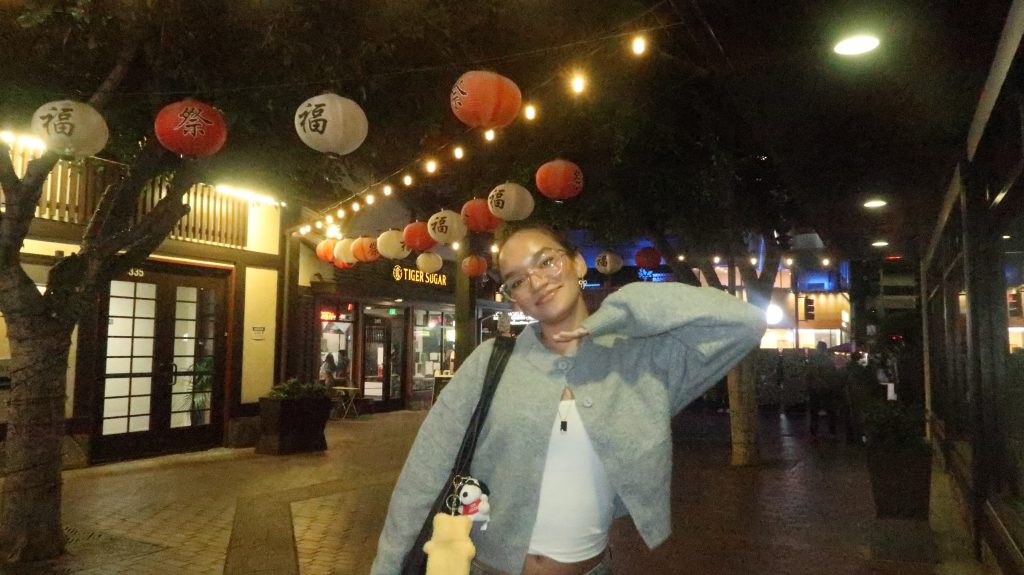
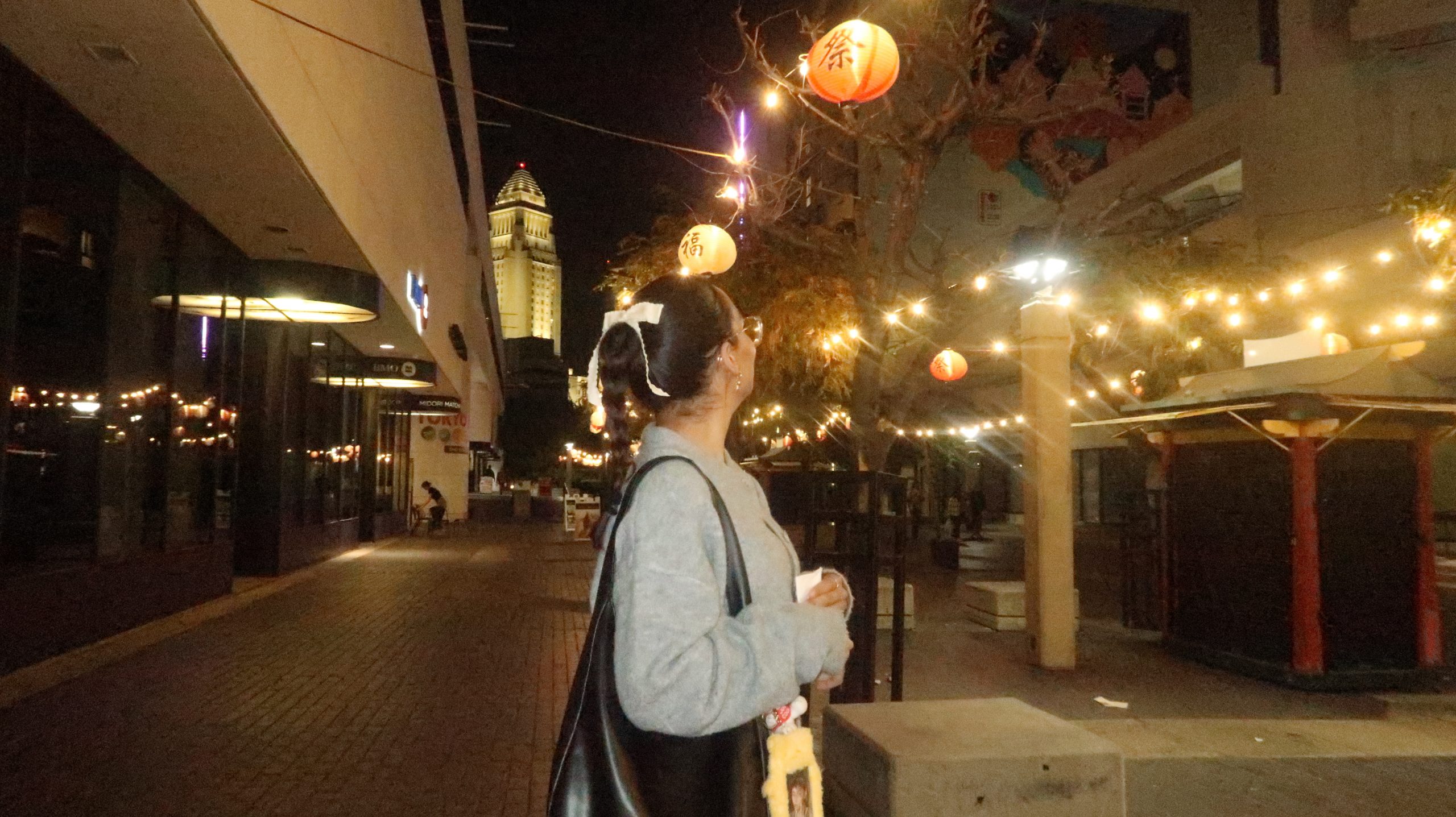
If you couldn’t tell by the lanterns and lights hanging across the alleyway, I was able to make it to Little Tokyo! One of my favorite spots I visited, the small district was lively and pretty active at night. I had to dress pretty warm for the nighttime in my cardigan, and the trees helped in the aesthetic of my photo. This photo doesn’t show off as loud as the other ones, as Little Tokyo was a pretty calm spot.
If there was one image I had to choose that seemed the loudest out of all of my pictures, it would definitely be this one. To me, anything Disney-related image just screams overcrowded, lots of walking, and lots of people – which is exactly what happened. The many strollers, the matching couple Disney shirts, the backpacks on everyone’s backs; this image captures the Disney experience pretty well. The image itself I feel portrays a perfect day, since the sky is scarily clear and the Disney castle is right in front of me. This day was definitely perfect, and wouldn’t trade it for the world.
This image was the last picture I took in California. Still in Disney, the image shows a giant rock behind me, that being one of Disney’s Star Wars rides. I think the Goofy hat signifies a good time spent at Disney, and the busy background shows a loud place. You can probably tell I was a bit tired in this moment since the last three months were so much fun. With my vintage Mickey Mouse t-shirt and my Cali zip-up hoodie, I was pretty much ready to go home after this picture was taken.
All in all, these images represented one of my favorite memories in life so far. Through visual storytelling, these images can tell newer audiences exactly what’s happening and help them feel what’s going on. The element of authenticity is crucial in any kind of visual storytelling, whether it be images, video, etc. Digital pictures can be perfect for capturing any emotion or occasion, and I don’t plan on putting my camera down any time soon.
As a semi-beginner editor of both video and audio, I want to make sure I know everything I need to know to create my own content. In this module, lots of research was done on sound itself, and I was able to better understand how podcasts are first created!
For my first reading, I read chapter eight of The Bare Bones Camera Course for Film and Video by Tom Schroeppel and Chuck Delaney. The book offers great beginner-friendly information about film and video editing, as well as small recommendations for smoother production experiences.
Going into this reading, I didn’t know much about sound editing, and wanted to get a clear idea of sound itself. The author, Tom Schroeppel, explains the concept of sounds, and also emphasizes the importance of clear audio, and tells us that even the most beautiful video footage can easily be ruined by poor sound.
Schroeppel really drives home how important sound can be in filmmaking. As a reader, I also learned the basics of recording sound that’s not just clear, but intentional—something that can actually add to the story rather than distracting from it. Choosing the right microphone, the location, and cancelling out background noise are all important factors in achieving clear audio quality for projects, and can make or break a video. Schroeppel even points out the difficulty of audio editing, saying that paying attention to the audio during filming can make things much easier during post-production.
Reading this made me realize how often sound can be overlooked in production, even though it’s what gives any video its mood, emotion, and sense of relatability. Good audio doesn’t just support the visuals—it completes them.
The next reading I wanted to discuss was an article by Kevin Anderson, “The Art of Creating an Invisible Podcast Episode Script”. Explained by Anderson, an invisible podcast script can come across very natural, enough that the listener doesn’t think it’s scripted. To do this, however, you still need structure! Creating an invisible script, includes key elements like the welcome message or sponsor introduction, should be linear and follow one after the other. This can help in staying organized and confident in what you’re saying, and can provide that important structure to the episode. Mentioning important elements such as attention-capturing openings and conversation-like scripts can help the script sound more natural, and not like a script is being read.
I liked Anderson’s message on mixing both planning and spontaneity to create a natural-sounding podcast. Things like intros, sponsor messages, or key transitions can be scripted, while the rest can be outlined with bullet points. This approach keeps the episode flowing smoothly and makes sure you cover all your main points. The article also highlights a few benefits of having a script: it keeps you on track, saves time during editing, and helps you sound more polished as a host. Most importantly, it lets you focus on connecting with your audience—since you’re not worrying about what to say next. Overall, the invisible script is all about preparation that sounds effortless once you hit record.
This reading, “Creating a Great Podcast Script: 3 Methods Top Podcasters Use” by Colin Gray, gets into various methods of podcast script writing, all tried and true by successful podcasts. The first method, writing the episode word-for-word, is mainly used by beginning podcasters and ensures that no detail is missed. This helps build confidence for these hosts, and can often change into less and less being written down as they go! Although this takes longer to prepare and may sound monotone when reading aloud, I personally believe this method works for more informational podcasts, where hosts rely on statistics and information to relay to viewers.
The next method, writing a detailed outline, is definitely a method I would use. I have also used this method in presentations, only writing an outline of the top points I want to cover. Gray recommends 5 to 10 bullet points of general topics to cover, then 4 to 7 bullets of information within those general topics. Anything past this may be too much to cover, and may need to be slimmed down to fit into the episode. This method can help in sounding more conversational yet still keep the host on topic, and provides a good middle-ground for both details and flexibility in the script. The last method, a rough bullet point podcast plan, is most likely for more experienced podcasts. This method is much quicker to plan, and involves lots of making things up as you go. These bullet points can be beneficial for more conversational podcasts, since valuable information can be lost or forgotten within a couple of bullet points.
This reading dives into the importance of taglines, hooks, and slogans in podcasts, and how they engage listeners. A tagline, part of your personal brand, should be the first thing a listener remembers about your podcast. Creating your own should be fun and attract viewers, as well as summarize or go with the theme of your podcast. One of my favorite podcasts, Upstairs Neighbors with Dom and Maya, has their own tagline: “Take a seat, get comfortable, and welcome to the neighborhood”. This tagline feels very “homey” and comfortable to me, and matches their concept incredibly well!
Hooks can be pretty similar. To make things interesting, hooks can be used to introduce segments, call-to-action (subscribe!), or introducing your sponsors (if they don’t write one for you already). I liked Anderson’s comparison of thinking of hooks as chapter headings in a book, helping listeners navigate your show. By thoughtfully crafting your podcast’s tagline and hooks, you can make a lasting impression on new listeners and encourage them to tune in regularly.
This reading covers many different tools to help elevate your podcast and make things a lot easier for production. I like how the author points out the simplicity of podcasting. You don’t need the best technology or editing software, just the message and audience! The article also points out various stages of podcast planning, and specific tools to help make the process smoother. With tools ranging from Alitu for AI-assisted planning and editing to Beehiiv as an email marketing platform, the true lesson I learned from this article is the importance of your message and who you want to reach, not the equipment you use!
This final article emphasizes the importance of comfortability and practice when refining your presentation skills to create an engaging and professional-sounding podcast. Whether you’re new to podcasting or looking to improve your skills, Cudmore provides tips and tricks to get comfortable in front of the mic. From talking in front of a teddy bear to repeating segments over and over again to avoiding cold water, these tips can help hosts in perfecting their scripts, and get comfortable with their listeners.
Another important point made by Cudmore is the importance of guest interviews, and knowing how to do them. It is crucial to listen and react to your guest, and develop more questions from what they’re saying. Guest interviews can definitely spice up a podcast and attract new listeners no matter who the guest is, so it’s important to make it count!
My Favorites!
While I don’t listen to many podcasts, I do have some that I tune into every now and then.
“Bring Back the Bald With Vanillamace!”, Upstairs Neighbors Podcast
One of my current favorite podcasts is Upstairs Neighbors, as mentioned earlier. While I’ve been following for a while, Dom and Maya (blue and green sweaters) recently announced a partnership with TMG Studios, a podcast network owned by fellow podcaster Noel Miller. Since then, their podcast quality and production has gone up, and more people have started listening. This episode, featuring trending streamer Vanillamace, attracted many new supporters and made the episode pretty popular for their channel. Their addition of the creepily-real-looking chipmunk noses also adds to the video, as many comments talk about this and other recent costumes the duo has added to spice up their videos.
“Huda: Love Island Tell All”, Call Her Daddy Podcast
While I don’t avidly watch this podcast, I have watched a few episodes of the guests I am most interested in. This podcast, one of the most watched and listened-to podcasts currently, is known for its popular guests and conversation format between the guest and Alex Cooper, the host. This podcast is incredibly high quality, and engages many different fan bases through their guests.
“Nightclub Turns Into GAS CHAMBER Killing 242 University Students In One Night”, Rotten Mango Podcast
This podcast is one of my favorite when it comes to storytelling. Stephanie Soo, the host, tells true stories as if they were happening right then. She and her team put lots of research into their episodes, and cover all kinds of true horror stories with dramatic but engaging storytelling. This was the first episode I’ve ever watched of hers, and the hook immediately pulled me into the story. Definitely recommend watching!!
Let’s Make a Podcast!
As a girl who has lots to talk about, I created a podcast to get my thoughts out and have conversation. One of my biggest feelings lately is FOMO: fear of missing out. As a full-time employee and graduate student, there isn’t much time for myself. I wanted to get my feelings out through this podcast, and hopefully connect with people in similar situations. I also definitely want to fit some pop culture topics into the episode, which can relate to my topic of FOMO.
Below is a planning document I created to outline my thoughts for my first episode!
All in all, creating podcasts is something just about anyone can do. No need for the fancy equipment or software, just a message and an audience. I’m excited to start this project, and hope you learned something from my takeaways!
Adopting a pet is much more than a transaction — it’s an emotional journey. What if we treated that journey with the same empathy and design thinking used in UX? A customer (or user) journey map helps us narrate someone’s path, see their motivations, frustrations, and “aha” moments.
What are Journey Maps?!
A journey map, defined by UX Mastery, is “a visual interpretation of the overall story from an individual’s perspective” over time and across channels. They can help us shift from a general view to an outside-in perspective, seeing each touchpoint as the adopter experiences it.
To further note the significance of journey maps, Paul Boag of Smashing Magazinewrote:
“Data often fails to communicate the frustrations and experiences of customers. A story can do that, and one of the best storytelling tools in business is the customer journey map.”
A well-designed map illuminates hidden pain, emotional peaks and valleys, and opportunities for improvement.
Screenshot from my customer journey map. It is important to create your own persona to elevate your storytelling!
Using those must-haves, I created a journey for Briana, a 23-year-old content creator living in a new city, who has been thinking about adopting a new furry roommate.
To get more specific, Briana also has some rules regarding her new furever friend. The dog must:
Stay small (to be able to stay in her building),
Match her energy (active, lively, and energetic),
Is ultra-friendly and camera-comfortable.
Smaller details, like lease rules (weight or breed restrictions), occasional long filming days, and a moderate budget were also considered 🙂
With all of this in mind, I sketched a detailed journey to see what she needs at each step.
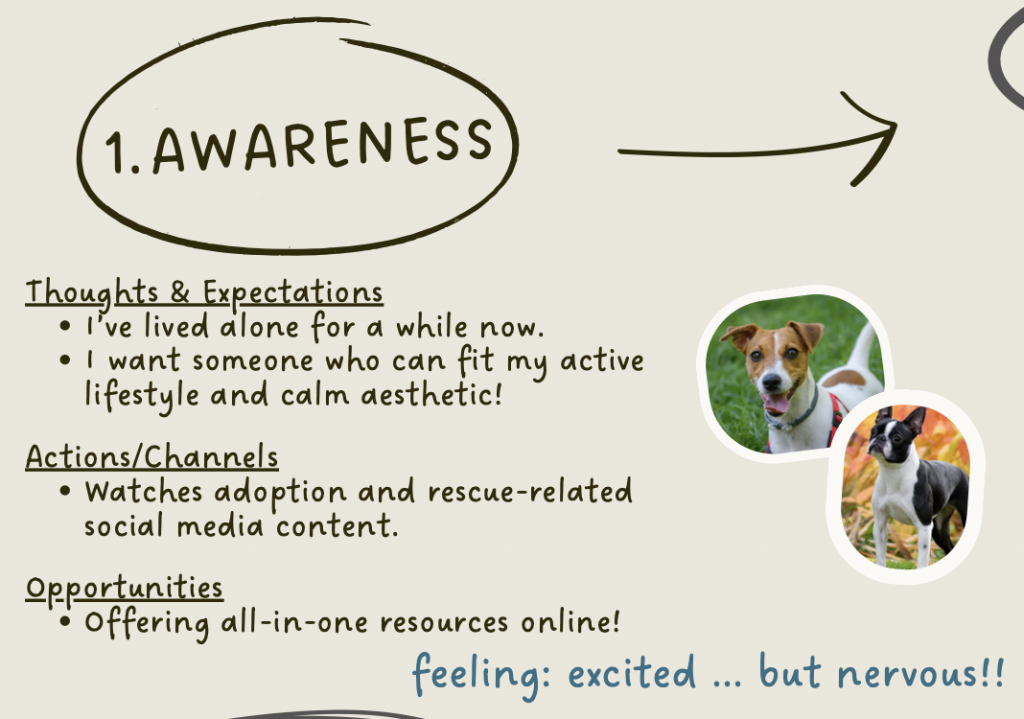
1. Awareness
At first, Briana scrolls through TikTok and Instagram reels about “small active dog breeds,” reads breed comparison posts, and stumbles on rescue profiles. She begins Googling: “active small dog apartment friendly,”“adopt small breed near me”. Here, her emotion is excited mixed with nervousness about her new journey ahead.
Opportunity: content creators or shelters should publish short listicle content (“Top 5 active small breeds”) or reels that show real apartment dogs in action.
Screenshot of my customer journey map of Briana’s step of awareness.
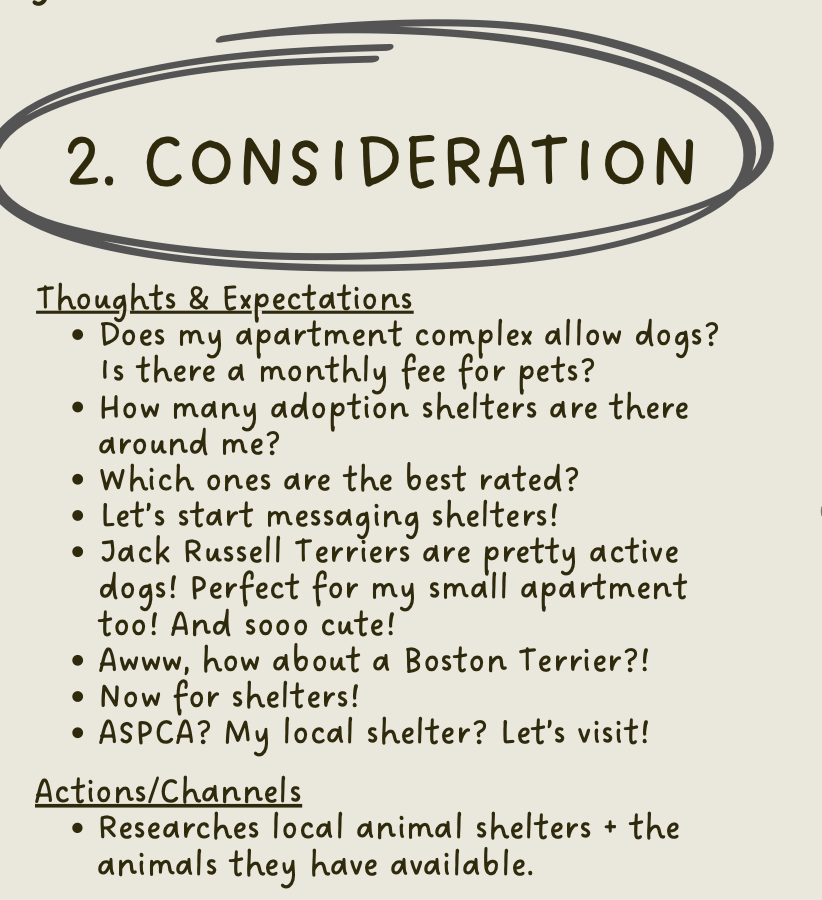
2. Consideration & Research
Here, Briana looks into her apartment rules, local shelter websites, and DMs shelters to ask specific questions about energy, socialization, and separation tolerance. She bookmarks promising profiles.
Frustration arises when the listings are vague: “good with people” without nuance, no video showing behavior. A rich video snippet or temperament tag can help remove this uneasiness!
Screenshot of my customer journey map of Briana’s step of consideration.
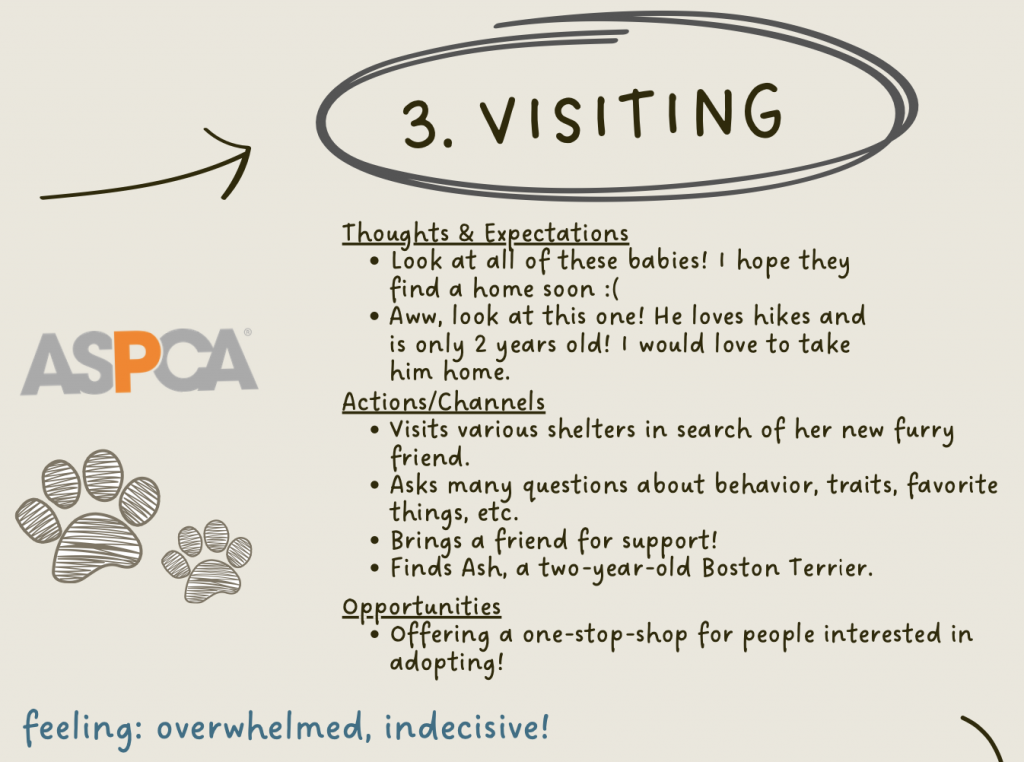
3. Visiting
Once she narrows it down, Briana visits shelters and meets fostered dogs. She tests how the dog reacts when she walks away, how it handles a phone (camera), and whether it’s comfortable meeting strangers and other dogs.
This is a “moment of truth” — a point of high emotional impact. According to UX mapping principles, these moments are prime for leaving a lasting positive impression for the customer.
Screenshot of my customer journey map of Briana’s step of visiting.
4. Adoption/Paperwork
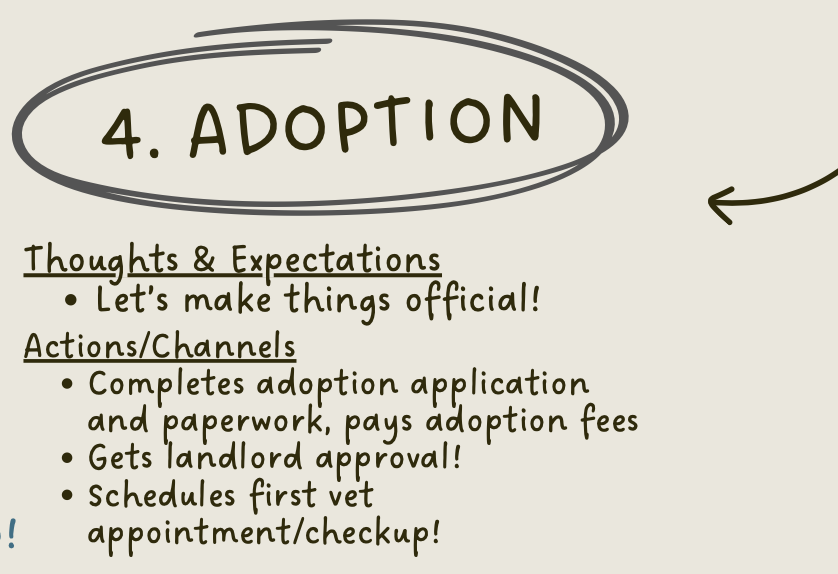
Briana has found a furever friend! Ash, a two-year-old Boston Terrier, loves hikes and was the most energetic pup in his litter. Briana can’t wait to spend the rest of their lives together.
This stage, however, often involves anxiety over landlord approvals, adoption fees, and transport logistics. Her heart is in it, but delays or surprise requirements can cause hesitation in this part of the process.
To smooth this, shelters should offer adoption toolkits (landlord letter templates, starter equipment suggestions, local trainer contacts) to reduce overwhelming moments like this for adopters.
Screenshot of my customer journey map of Briana’s step of adoption.
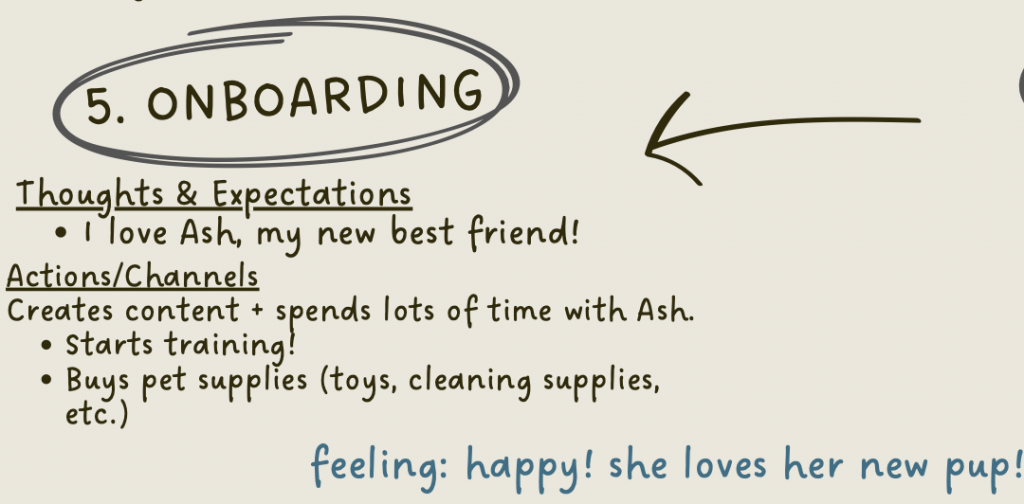
5. Onboarding (First 30 Days)
This phase is about habits: the first vet visit, crate training, walks, socialization, and linking dog life to her content routine (e.g. shooting “meet my dog” reels). She experiments with leaving the dog alone for short stretches, sets up enrichment toys, and teaches leash manners.
This is where consistency is crucial. Small missteps in training or routines often lead to stress or regression, which can be stressful for new pet owners. Offering a one-stop shop for newly adopted animals to receive training can definitely help ease this issue!
Screenshot of my customer journey map of Briana’s step of onboarding.
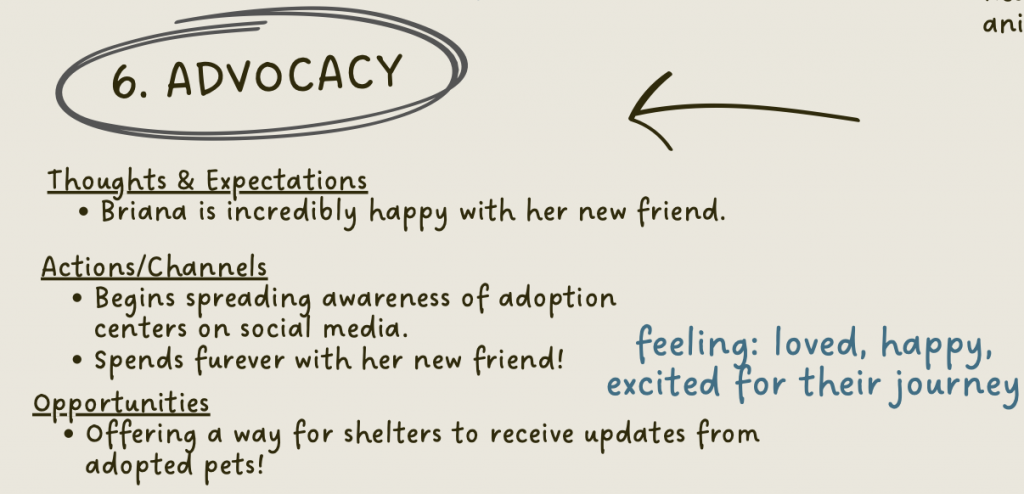
6. Advocacy
If things go well, Briana becomes an ambassador. She shares her adoption story, tags the shelter, posts updates, and may inspire others to adopt. Her journey becomes content — which also feeds the adoption ecosystem! Thanks, Briana!
Screenshot of my customer journey map of Briana’s step of advocacy.
Insights & Opportunities
Overall, creating this customer journey map allowed me to better visualize a quite emotional journey for a customer. In this process, I began to understand that:
Videos are gold! At every stage, from research to meeting the pup, short video content beats static photos for conveying temperament.
Micro-moments matter: The moment she tests camera comfort or a short separation is where she’ll decide yes or no.
We can reduce friction or hesitation by using simple tools (landlord letter, adoption kit) to reduce drop-off after adoption.
The first 30 days can be fragile! Quietly supporting or having training check-ins can improve retention and satisfaction for customers.
Content synergy: Because Briana is a creator, the adoption process can feed into her content pipeline. This can be both good for her and good for the shelter’s visibility!
Final Thoughts
Journey maps aren’t just for tech or big companies — they’re frameworks for empathy. By translating Briana’s adoption journey into stages, emotions, and touchpoints, you can reveal where help is needed and where relationships may deepen. As UX Mastery puts it, “the process of journey mapping is what’s most important” — not just the visual artifact. And as Smashing Magazine reminds us, data alone fails to capture the lived experience — but stories have the opportunity to bridge that gap.
I would highly recommend the practice of customer journey mapping for anyone with newer ideas or projects. This way, you can better understand both your customers and your product.
Below is an attached PDF of my customer journey map. Enjoy!
Ideation is a crucial part of the design thinking process, allowing designers to generate a wide range of possible solutions for user problems (Interaction Design Foundation). In this exercise, I explored ideation techniques to address six POV statements related to iMovie, CapCut, and Instagram. My approach focused on using at least two different ideation techniques per problem statement, generating as many solutions as possible, and evaluating which methods were most useful.
Last week, I created six POV statements for the apps Instagram, iMovie, and CapCut based on real user reviews to get a better understanding of the apps. To get an even better understanding of various ideation techniques, I will apply them to my POV statements.
The mentioned POV statements for iMovie, CapCut, and Instagram.
Looking Into iMovie
My previous POV statements include:
Users who use iMovie need more features to continue using the app instead of moving onto similar free editing apps.
Users who use iMovie need updates to the software because the app has remained the same since its creation.
For users who use iMovie and need more features to stay loyal to the app, I applied brainstorming and brainwriting, mentioned by the Interaction Design Foundation. Defined by the IDF, brainstorming is a method used to “generate ideas to solve clearly defined design problems”, mainly used in the ideation phase of design thinking. With this, brainstorming helped me quickly generate ideas such as introducing AI-assisted editing, customizable templates, and integrated stock media. While these were quick ideas, I will be able to further define them as I continue to brainstorm.
Brainwriting, on the other hand, allowed me to quietly jot down ideas before building on them. Defined by the IDF, brainwriting, while pretty similar to brainstorming, involves writing these quick ideas down on paper, and after a few minutes, passing their paper to another participant who can further expand on the ideas. I found that this idea works pretty well for me, as I enjoy writing things down in one place, even if the fellow participant is me 🙂 In the end, I resulted in additional solutions like collaborative editing and advanced color grading, to further engage and attract new users, as well as keeping current users interested in iMovie.
Final brainwriting exercise! Shows my thought process for creating potential solutions to this issue. I first named potential issues within this issue, then looked back a couple of minutes later to create solutions with a fresh mind.
For users who need updates to iMovie due to its stagnation, I used SCAMPER and mind mapping.
SCAMPER (Substitute, Combine, Adapt, Modify, Put to another use, Eliminate, Rearrange), encourages you to ask different questions to create new solutions. Asking seven different types of questions, SCAMPER can help you further understand how you can improve existing products or services. In a guide given by the IDF, SCAMPER encouraged me to systematically reimagine iMovie’s capabilities, such as adapting mobile features for desktop or combining editing with social media sharing tools. I definitely enjoy using SCAMPER, as it truly helps me further understand my issue at hand, as well as how to better solve it for everyone!
Mind mapping, for me, visually connected ideas like performance optimization, UI redesigns, and enhanced export options. These techniques were particularly useful because they helped me see both incremental improvements and entirely new directions for the app. Defined by the IDF, mindmapping can help designers “build a web of relationships”, to help better solve these issues at hand. While I created my mind map mentally, I first thought of my overall solution, then was able to get more specific. This technique reminded me of brainwriting, as they both require writing down your thoughts and getting more specific. I do prefer mindmapping, however, because it is a technique I’ve used in the past, and I enjoy how it keeps me organized with my thoughts.
Getting Into CapCut
For this app, my previous POV statements include:
Users who use CapCut need more features on the app’s free version, such as extracted audio, because basic features can lead them to using other apps.
Users who often edit with CapCut need more reliable quality and better updates because of large files and exporting.
To expand on these issues, I used the ideation techniques role-playingand affinity diagramming.
Role-playing helped me step into a user’s shoes and imagine frustrations with missing audio extraction or watermarks, leading to creative solutions like free limited-use advanced features or AI-assisted sound editing. When researching, I learned that role-playing can help with “coming up with ideas or solving problems {in which} different participants adopt different roles, personas, or perspectives, thereby providing a broader and more complete range of potential solutions”, (Farrar, 2024). With this technique, I was reminded of my previous exercise from last week, when I was able to immerse myself fully into the world of reviews, and understand users’ concerns with apps that I currently use.
Affinity diagramming is defined by the NN Group as “organizing related observations, ideas, concepts, or findings into distinct clusters” (Krause & Pernice, 2024). This easy-to-use technique helped me organize these ideas into categories such as usability, functionality, and monetization, making it easier to identify which concepts had the most impact.
For users who edit large files in CapCut and need reliable updates, I appliedbrainwalking and storyboarding. Brainwalking, similar to brainwriting, allowed me to move physically while thinking (a technique I enjoyed), while generating ideas like cloud-based project saving, batch rendering, and incorporating faster export options. Storyboarding allowed me to visualize the user journey and see pain points in real time, revealing opportunities for improving stability and performance.
Finally… Instagram!
For Instagram, my previous POV statements include:
Users who are active on social media need to have more relatable algorithms because TikTok is known for their accurate algorithms.
Users who use Instagram need less advertisements because competing apps do not distract users with ads.
For social media users who need less advertisements on their timeline, I utilized crowdstorming and Mash-Up.
I mainly used crowdstorming during last week’s exercise, when looking at current user reviews of these apps. Many of Instagram’s reviews mentioned the app’s overuse of advertisements on timelines, which have stirred users away from the app. Thanks to this exercise, I generated ideas such as ad-free subscription tiers and native sponsored content labeling, which can help both users and developers with this issue.
Real negative review left from Instagram user!
Mash-up pushed me to consider what would make an algorithm worse, which in turn inspired solutions to avoid those pitfalls and create a more engaging experience for users all around, including gamifying ad-free experiences or integrating sponsored content into story templates creatively, and urging companies to do so.
Lastly, to address the unrelatable algorithms that users may face, I utilized brainstorming and creative pause. Brainstorming allowed me to generate ideas for users such as personalized content filters or adjustable recommendation settings to help manually set their algorithms. Creative pause, letting me take a break and step back for a second, allowed me to come back with a fresh mind to this issue at hand, and generate ideas such as brand-focused initiatives to create better content for algorithms, and even creating influencer-run programs to help newer creators with creating engaging content for algorithms.
All in all, my favorite techniques to use were brainwriting, brainwalking, and SCAMPER, as they encouraged independent visual, and physical thinking. With these ideation techniques, these solutions directly address user pain points while promoting engagement and satisfaction across platforms. By using a variety of ideation methods, I was able to generate innovative, actionable ideas that can enhance user experience and keep these apps competitive in the rapidly evolving digital landscape.
I strongly urge you to try them in your next project!
Below is a PDF of my notes and overall findings using ideation techniques. Feel free to. check it out!